QX-3 Installation Guidelines
For optimal product performance with your QX-3 Econo-Fuel Chips follow the installation guidelines:
Installing the QX-3 is Easy to Do – It Literally Takes Minutes!
1. Locate the underside of your fuel tank. Most vehicles can be accessed by crawling under the vehicle. Some vehicles need to be raised onto a rack in a service bay. To assure you apply the QX-3 chips to the correct location for best results, you may want to consult your mechanic (see step 3).
2. Locate the area of the fuel tank where the fuel leaves the tank for the engine (fuel pump). It is critical that the chips be placed relative to the fuel uptake/fuel pump for optimum results.
3. To install the QX-3 chips in the proper location refer to the diagram below. The chips need to be installed keeping five to ten inches (7.5 avg.) between the edges of the chips. The area where the chips are installed should be flat. The QX3 Chips should be installed closest to the area of the tank where the fuel pump exists/exits for the engine, as described above. Consult your mechanic to assure correct placement.
4. Clean the area where you intend to install QX-3 Chips. A wire brush is a good tool to use. If the tank has a resin coating, use the brush or a razor blade to remove that coating in the area where you intend to apply the chips.
5. Peel off the paper on the back (adhesive side) of the QX-3. The adhesive on the chips is strong, but you are better off also using a “super glue” type product. A small amount of this “super glue” will be satisfactory.
6. After placing the QX-3 Chips on the tank, hold them in place with your hand for up to 30 seconds, making certain they have adhered securely.
7. Do not cover the non-adhesive side with any glues, tapes etc. as this will impact performance of the QX-3. This side must remain exposed.
8. The QX-3 is non-transferable, and therefore should not be removed from one vehicle and applied to another. In the unlikely event of incorrect placement, contact BioPro VIP Customer Service to arrange exchange/replacement of your QX3 chips (shipping charges are additional).
Special Considerations:
Tank Covers:
Many vehicles have a plastic cover that fits over the tank. Be sure that you apply the QX-3 directly on the fuel tank, not the fuel tank cover. In most cases you can access the tank via a panel or door on the plastic cover. If for some reason you are unable to access the tank, please visit your mechanic or local garage and ask them to apply the QX-3 directly onto the tank as per the instructions above.
Fiberglass Tanks:
Fiberglass-tanks contain resins that make it more difficult for energy/frequencies to spread. Plastic and Metal are better conductors than fiber glass. In order to improve the performance of QX-3 on fiber glass tanks, the units should be applied on the fuel-pump. The same procedure is suggested when individuals are not experiencing the desired results with any other types of tanks.
Setting the Right Expectation:
.
In order to achieve increased mileage and reduced emissions, two Econo Fuel Chips are needed per vehicle for commercial vehicles with tanks up to 30 gallons. The QX-3 are designed to operate in pairs (two QX3s) per 30 U.S. gallons (113 Liter) tank of fuel. It is recommended that you use and additional QX-3 set for each additional 30 U.S. gallons (113 Liter) in fuel tank capacity.
Once the QX-3 chips are installed, performance should NOT be measured on the first few tanks of fuel. For the QX-3 to operate at maximum capacity it is important that you allow your vehicle to burn 3-4 tanks of fuel with the QX-3 applied to the tank. After the 4th tank, change your oil. Changing the oil is a necessary step to achieve maximum results because it removes built up carbon deposits that have been released from the engine after the QX-3 have been affixed.
Note: When measuring for improved mileage it is imperative that you measure against similar driving conditions prior to when the QX-3 were installed (highway versus city, weather etc.).
Installation Reference Diagram:
Correct Installation Incorrect Installation 

Incorrect Installation

|
Performance Checklist:
· Be sure that you have applied the QX-3 directly onto the Fuel tank…not the fuel tank cover (as described in “Installation” above)
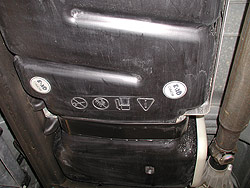
· As a result of new vehicle manufacturing technology many parts under the vehicle now closely resemble the fuel tank. Be sure that you have actually applied the QX-3 to your fuel tank and not some other part of your vehicle. The best way to do this is to look at the diagram or description in your owner’s manual. If you are unable to find this information in your owner’s manual please consult your dealer or go to your mechanic.
· Be sure that you have not covered up the non-adhesive side of the QX3 -this side must remain exposed. f you are having your vehicle rustproofed after the QX-3 have been affixed to your fuel tank be sure to instruct the rustproofing dealer to temporarily cover the QX-3 while the spraying is taking place
· Be sure that you have spaced the QX-3 a minimum distance of 5 inches apart…maximum distance 10 inches apart (ideal is 7.5”).
· Be sure that you have the appropriate number of QX-3 on your tank- 1 set of 2 for every 30 U.S. gallon (113 Liters in Fuel)
.
.
Measuring Your Performance
.
If you intend to measure the performance of your QX-3 we recommend that you record a baseline reading of your fuel mileage and or emissions prior to installing the QX-3.
· To establish a baseline reading for emissions prior to the installation of your QX-3, please go to a vehicle emissions testing center to have the test performed. Test again after your 4th tank of fuel and changing your oil.
· To establish a baseline reading for your vehicles mileage prior to the installation of the QX-3 follow the following steps:
· If you have an onboard computer in your vehicle simply record the information as reported by your on board computer based on regular driving patterns. Note: To ensure accurate comparative results it is critical that you are recording your information based on your typical driving patterns. Comparing mileage on a tank of fuel used for city driving versus highway driving would be pointless as your vehicle, in most cases, burns far more fuel in city versus highway driving…make sure you are comparing apples to apples!
· If you do not have an onboard computer simply reset your odometer and record your total mileage for a full tank of fuel based on your typical driving patterns (as described above). After having determined your average mpg over 4+ tanks, apply the QX3 chips and perform the same tracking for the next 4+ tanks of fuel. This will show you the QX3 difference!